Free YouTube tags generator — keywords from real searches
Enter your video title and get tag suggestions pulled directly from what people type into YouTube — ready to edit and paste straight into YouTube Studio.
- Free — no account needed
- Nothing stored, nothing tracked to you
- Live data from the official YouTube API
How to use the Tags Generator
-
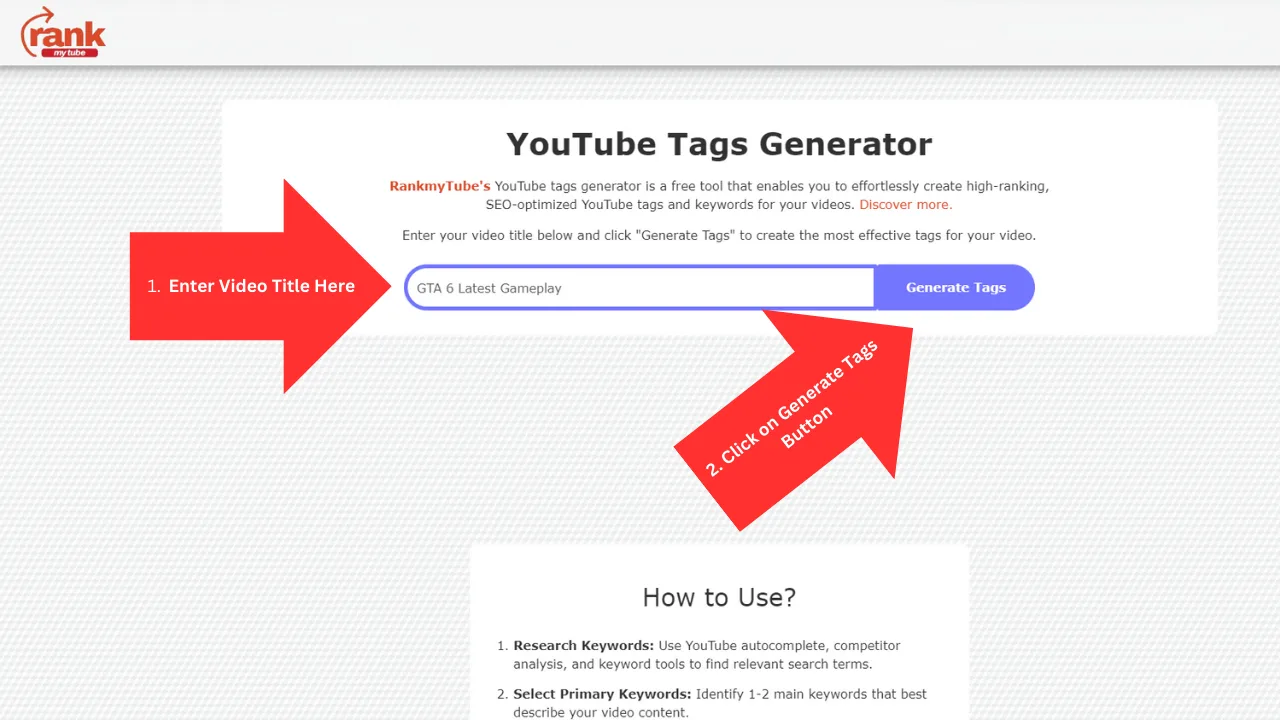
Enter your video title
Type the working title of your video. The closer it is to the one you will publish, the more relevant the suggestions.
-
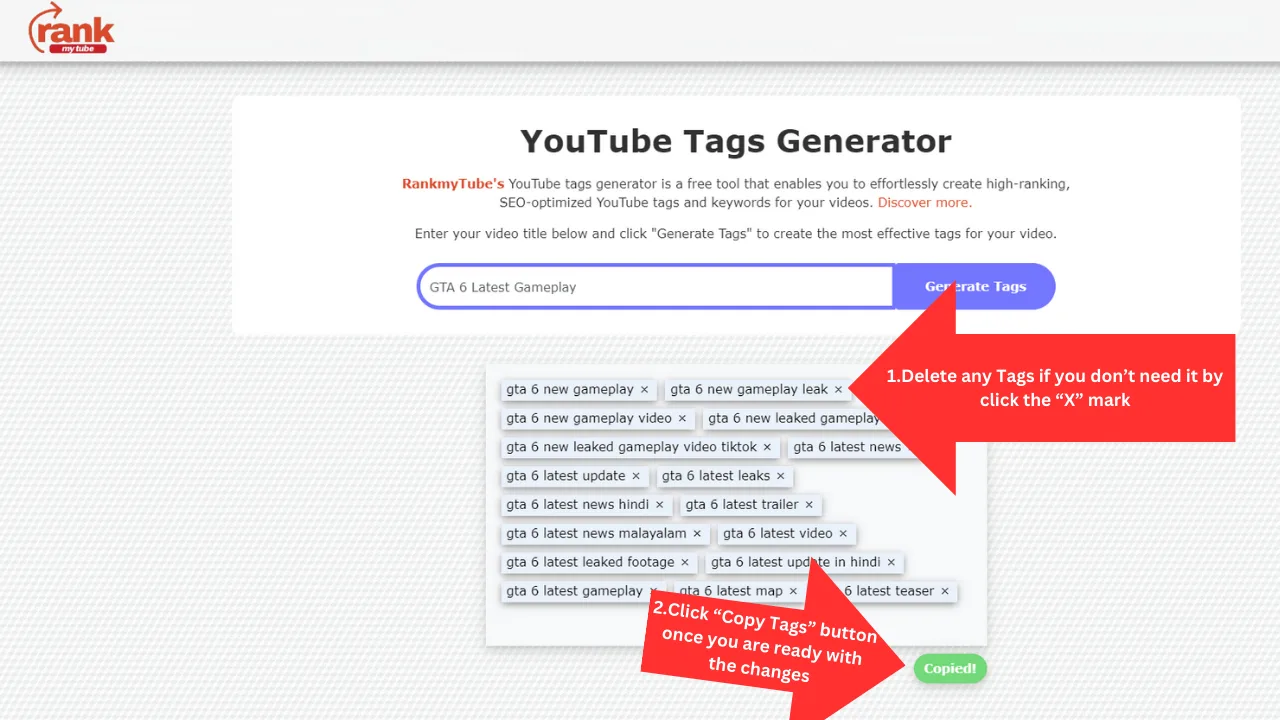
Trim what does not fit
Remove any suggestion that does not genuinely describe your video. Relevant tags help discovery; padding with loosely related keywords does not.
-
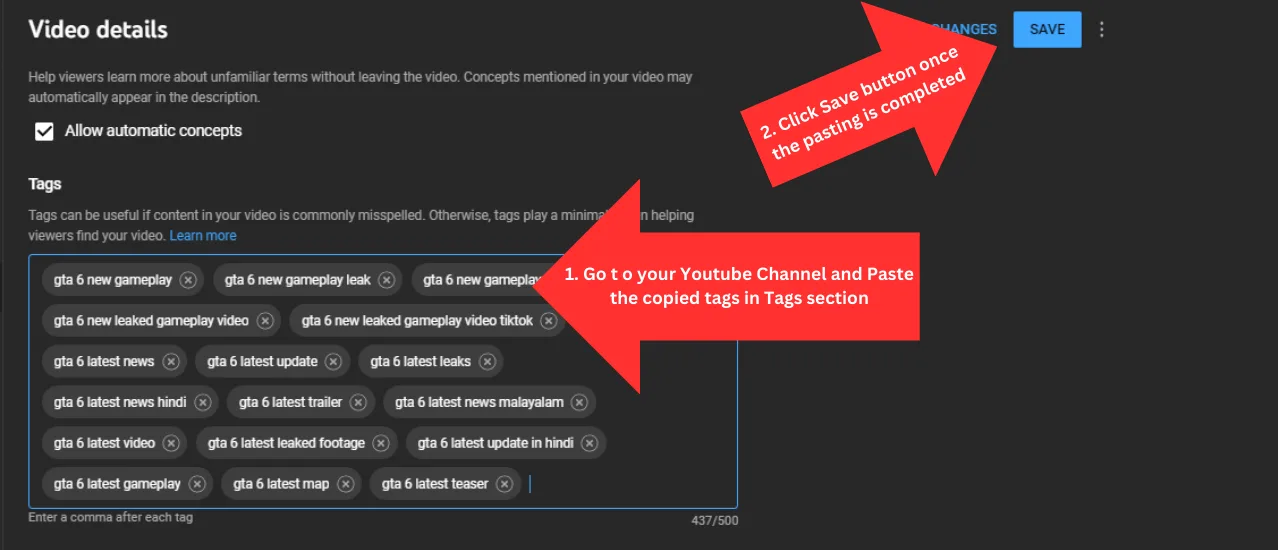
Paste into YouTube Studio
Copy the list with one click, then paste it into the Tags field under your video details in YouTube Studio and save.
What makes a good YouTube tag
A good tag describes what the video genuinely is. It matches how a real person would search for it, and it would still make sense to a viewer who read it aloud.
Long-tail phrases usually outperform single words. "How to bake a chocolate cake without an oven" faces far less competition than "cake", and the people searching it have a much clearer intent — which is exactly the audience most likely to watch to the end.
Include obvious variations and common misspellings of your main subject. This is one of the few places tags still carry real weight, because your title cannot reasonably contain every spelling.
Where tags fit in YouTube SEO
Tags are a supporting signal, not the main one. Your title, thumbnail, opening seconds and audience retention do most of the work in deciding how far a video travels.
The practical approach is to spend most of your effort on a title and thumbnail that earn the click, then add well-chosen tags because they take under a minute and cost nothing.
Avoid the common mistake of copying a large tag list between unrelated videos. Irrelevant tags do not help discovery and make it harder for YouTube to categorise your channel consistently.
A repeatable tagging routine
Start from your finished title, generate suggestions, and keep only what genuinely matches the video. Add two or three broader category terms so YouTube can place the upload in context.
Check what is already working in your niche using the trend checker, and note the vocabulary top-performing videos use. Then revisit tags on older uploads occasionally as the way people search shifts.
Frequently asked questions
How do I generate tags for a YouTube video?
Enter your video title and choose Generate tags. You will get keyword suggestions drawn from real YouTube search queries, which you can edit and copy directly into YouTube Studio.
Where do the tag suggestions come from?
Suggestions come from YouTube's own search autocomplete — the phrases that appear as you type in the YouTube search box. They reflect what people genuinely search for, rather than guesses or invented keywords.
How many tags should I add to a YouTube video?
YouTube allows up to 500 characters of tags in total. Most creators land on 10 to 20 genuinely relevant tags. A focused mix of specific long-tail phrases and a few broader terms works better than filling the limit.
Do YouTube tags still matter for ranking?
They are a minor ranking signal compared with your title, thumbnail and viewer retention. Tags mainly help YouTube understand context, including for commonly misspelled terms. Treat them as a small, cheap improvement, not the main lever.
Is the YouTube tags generator free?
Yes. It is free to use with no account, no trial and no daily cap on searches.
Do you store my video titles?
No. Your title is used to fetch suggestions and is not saved to any database or linked to you. There is no account, so there is nothing to store it against.
More free YouTube tools

YouTube Trend Checker
Find the videos climbing in any country or category today, and see the tags their creators used.
Check trends
YouTube Video Analyzer
Get a 10-point SEO audit for any YouTube video: title score, tag count, description quality and engagement rate.
Analyze video
YouTube Title Generator
Turn any topic into 10 click-worthy YouTube title ideas using the five formats behind most viral videos.
Generate titles
Multi-platform Hashtag Generator
Get the right hashtag count for every platform — YouTube, Instagram and TikTok — from a single topic in seconds.
Generate hashtags