What's trending on YouTube — live results by country
Pick a country and category to see the videos climbing right now — with views, likes and the exact tags creators used. Find your next topic before the trend peaks.
- Free — no account needed
- Nothing stored, nothing tracked to you
- Live data from the official YouTube API
How to use the Trend Checker
-
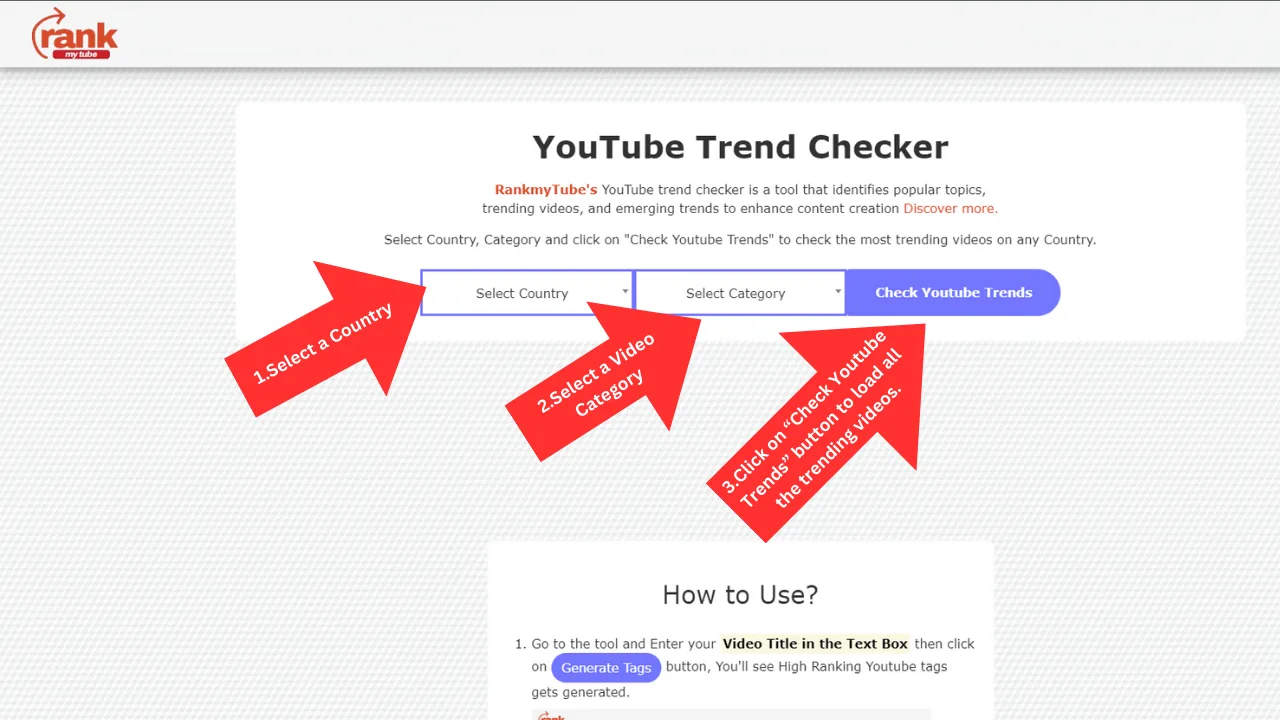
Choose a country and category
Pick any of 126 countries, or Worldwide for a cross-market view. Narrow to a category like Music or Gaming to see trends inside your niche.
-
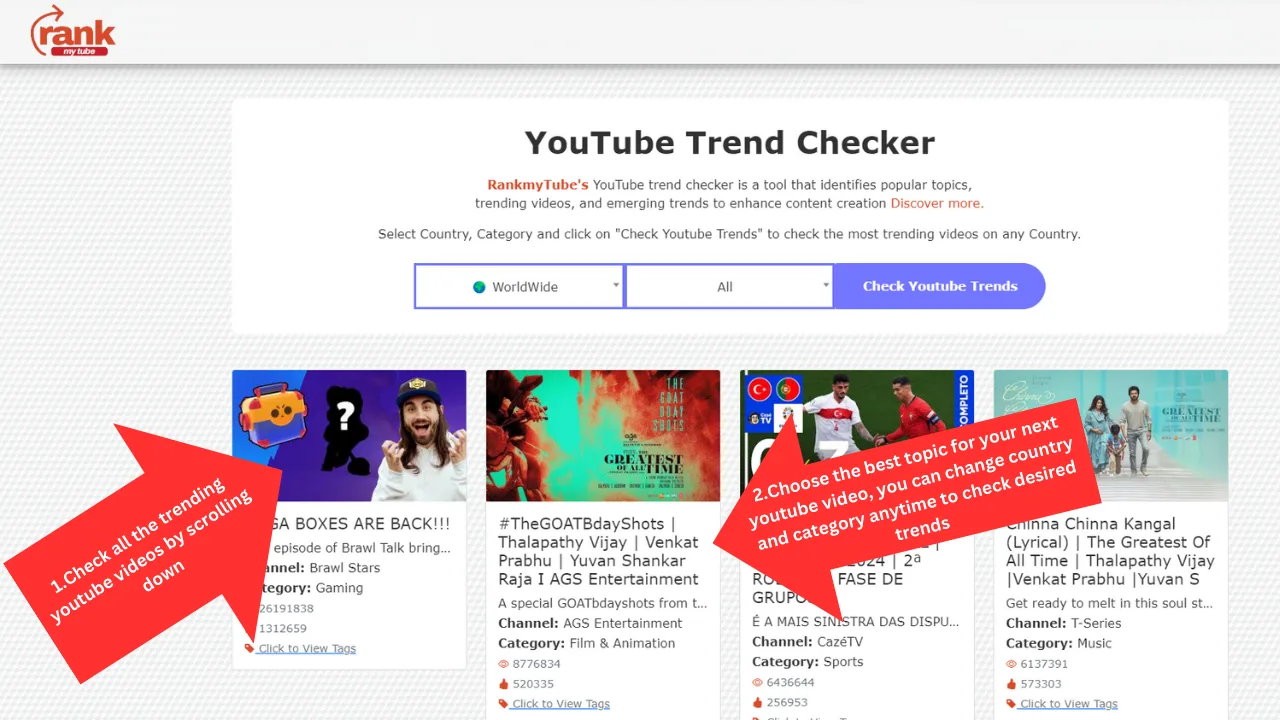
Scan what is performing
Results are ordered by popularity, with view and like counts on every card, so you can judge momentum at a glance rather than guessing.
-
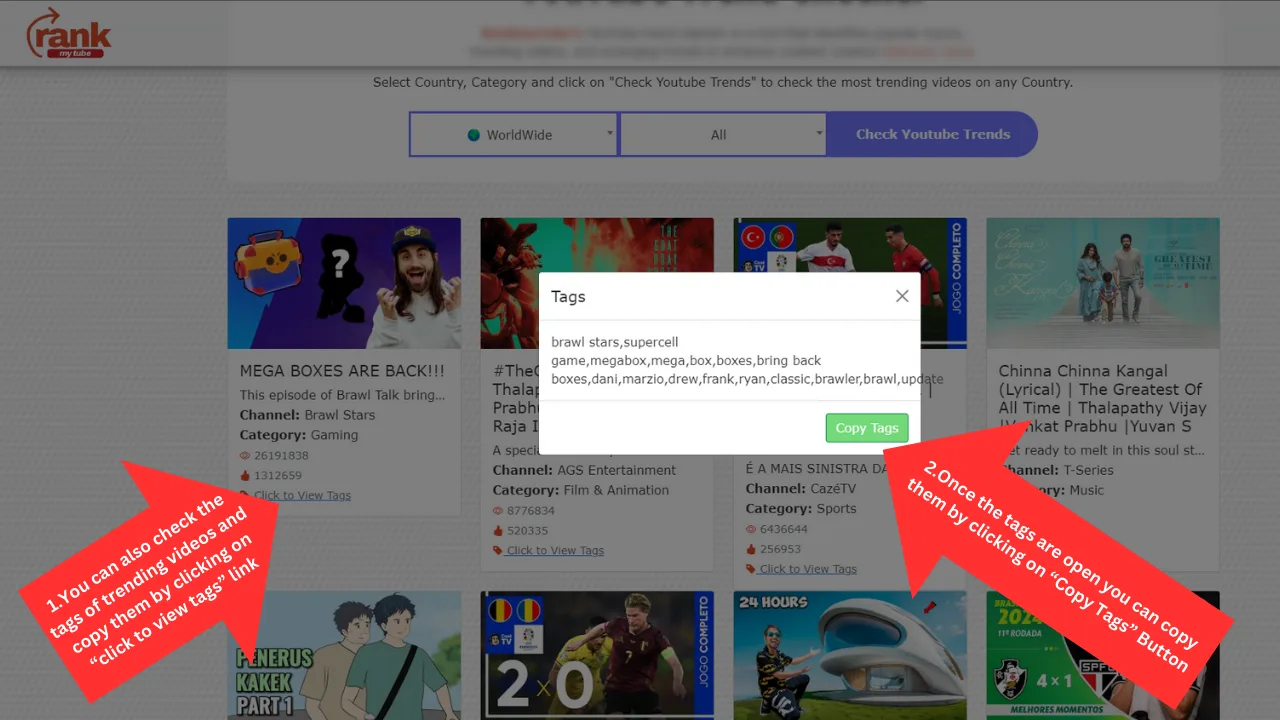
Copy the tags that work
Open any video to see the exact tags its creator used, and copy them in one click to adapt for your own upload.
Why trending data beats guesswork
Most channels stall because of topic selection, not production quality. A well-made video about a subject nobody is searching for will always struggle against an average video that lands on a rising trend.
Trending charts tell you where attention is going right now. Checking them before you plan an upload replaces a guess with evidence, and it costs a minute.
How to read the results
View count shows scale, but the ratio of likes to views is often the better signal — it suggests how strongly an audience responded, which tends to predict whether a topic keeps travelling.
Look for patterns rather than single videos. If several unrelated channels are covering the same subject in the same week, that is a trend forming. One outlier is usually just one outlier.
Check the tags on the videos performing best. They reveal the vocabulary an audience is actually searching with, which is frequently different from the words a creator would choose instinctively.
Timing matters more than most creators expect
Trends have a curve. Arriving early means less competition and a better chance of being the video the algorithm surfaces; arriving late means competing with established uploads that already have watch time behind them.
Checking trends weekly, rather than only when you are stuck for ideas, is what turns this from a rescue tool into a planning habit.
Frequently asked questions
How do I find trending YouTube videos in my country?
Select your country and a category, then choose Check trends. You will see the videos currently most popular on YouTube in that market, with view counts, like counts and the tags each creator used.
Is the YouTube trend checker free?
Yes, completely. There is no account to create, no trial, and no limit on how many searches you can run.
How current is the trending data?
Results come from the official YouTube Data API at the moment you search, so you are always seeing the live trending list rather than a cached snapshot.
Why do some countries return no results?
YouTube does not publish a trending chart for every country and category combination. If a pairing comes back empty, try a broader category such as All, or a neighbouring market.
Can I see which tags a trending video is using?
Yes. Each result has a View tags option showing the tags that creator applied, which you can copy in one click. Some videos return none, because many creators leave the tag field empty.
Does checking trends affect my YouTube channel?
No. The tool only reads public data. It never connects to your channel, asks for permissions, or changes anything on your account.
More free YouTube tools

YouTube Tags Generator
Turn any video title into relevant, search-backed tags you can copy straight into YouTube Studio.
Generate tags
YouTube Video Analyzer
Get a 10-point SEO audit for any YouTube video: title score, tag count, description quality and engagement rate.
Analyze video
YouTube Title Generator
Turn any topic into 10 click-worthy YouTube title ideas using the five formats behind most viral videos.
Generate titles
Multi-platform Hashtag Generator
Get the right hashtag count for every platform — YouTube, Instagram and TikTok — from a single topic in seconds.
Generate hashtags